<pre id="vvttv"><mark id="vvttv"><progress id="vvttv"></progress></mark></pre>
    <pre id="vvttv"></pre>

      <p id="vvttv"></p>

          <p id="vvttv"></p>

                <p id="vvttv"></p>

                <pre id="vvttv"><cite id="vvttv"><progress id="vvttv"></progress></cite></pre>

                  <output id="vvttv"><dfn id="vvttv"><th id="vvttv"></th></dfn></output>

                    <p id="vvttv"></p>

                    三維標量場觀察器?

                    相關文檔: 將Mayavi嵌入到界面中
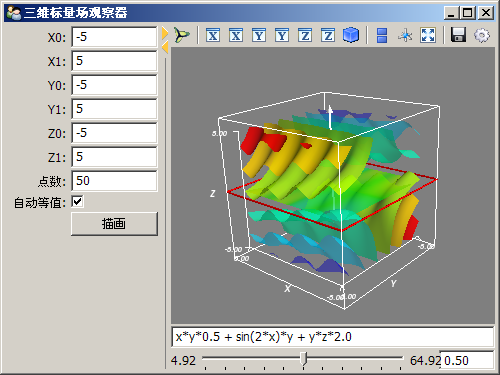
                    _images/mayavi2_embed02.png
                    # -*- coding: utf-8 -*-
                    import numpy as np
                    from numpy import *
                    
                    from enthought.traits.api import *
                    from enthought.traits.ui.api import *
                    from enthought.tvtk.pyface.scene_editor import SceneEditor 
                    from enthought.mayavi.tools.mlab_scene_model import MlabSceneModel
                    from enthought.mayavi.core.ui.mayavi_scene import MayaviScene
                    
                    class FieldViewer(HasTraits):
                        """三維標量場觀察器"""
                        
                        # 三個軸的取值范圍
                        x0, x1 = Float(-5), Float(5)
                        y0, y1 = Float(-5), Float(5)
                        z0, z1 = Float(-5), Float(5)
                        points = Int(50) # 分割點數
                        autocontour = Bool(True) # 是否自動計算等值面
                        v0, v1 = Float(0.0), Float(1.0) # 等值面的取值范圍
                        contour = Range("v0", "v1", 0.5) # 等值面的值
                        function = Str("x*x*0.5 + y*y + z*z*2.0") # 標量場函數
                        plotbutton = Button(u"描畫")
                        scene = Instance(MlabSceneModel, ()) # mayavi場景
                        
                        view = View(
                            HSplit(
                                VGroup(
                                    "x0","x1","y0","y1","z0","z1",
                                    Item('points', label=u"點數"),
                                    Item('autocontour', label=u"自動等值"),
                                    Item('plotbutton', show_label=False),
                                ),
                                VGroup(
                                    Item(name='scene', 
                                        editor=SceneEditor(scene_class=MayaviScene), # 設置mayavi的編輯器
                                        resizable=True,
                                        height=300,
                                        width=350
                                    ), 'function',
                                    Item('contour', 
                                        editor=RangeEditor(format="%1.2f",
                                            low_name="v0", high_name="v1")
                                    ), show_labels=False
                                )
                            ),
                            width = 500, resizable=True, title=u"三維標量場觀察器"
                        )
                          
                        def _plotbutton_fired(self):
                            self.plot()
                            
                        def _autocontour_changed(self):
                            "自動計算等值平面的設置改變事件響應"
                            if hasattr(self, "g"):
                                self.g.contour.auto_contours = self.autocontour
                                if not self.autocontour:
                                    self._contour_changed()
                         
                        def _contour_changed(self):
                            "等值平面的值改變事件響應"
                            if hasattr(self, "g"):
                                if not self.g.contour.auto_contours:
                                    self.g.contour.contours = [self.contour]
                         
                        def plot(self):
                            "繪制場景"
                            # 產生三維網格
                            x, y, z = mgrid[
                                self.x0:self.x1:1j*self.points, 
                                self.y0:self.y1:1j*self.points, 
                                self.z0:self.z1:1j*self.points]
                            scalars = eval(self.function) # 根據函數計算標量場的值
                            self.scene.mlab.clf() # 清空當前場景
                            
                            # 繪制等值平面
                            g = self.scene.mlab.contour3d(x, y, z, scalars, contours=8, transparent=True)
                            g.contour.auto_contours = self.autocontour
                            self.scene.mlab.axes() # 添加坐標軸
                    
                            # 添加一個X-Y的切面
                            s = self.scene.mlab.pipeline.scalar_cut_plane(g)
                            cutpoint = (self.x0+self.x1)/2, (self.y0+self.y1)/2, (self.z0+self.z1)/2
                            s.implicit_plane.normal = (0,0,1) # x cut
                            s.implicit_plane.origin = cutpoint
                            
                            self.g = g
                            self.scalars = scalars
                            # 計算標量場的值的范圍
                            self.v0 = np.min(scalars)
                            self.v1 = np.max(scalars)
                      
                    app = FieldViewer()
                    app.configure_traits()   
                    

                    上一篇文章

                    NLMS算法的模擬測試

                    下一篇文章

                    頻譜泄漏和hann窗

                      <pre id="vvttv"><mark id="vvttv"><progress id="vvttv"></progress></mark></pre>
                      <pre id="vvttv"></pre>

                        <p id="vvttv"></p>

                            <p id="vvttv"></p>

                                  <p id="vvttv"></p>

                                  <pre id="vvttv"><cite id="vvttv"><progress id="vvttv"></progress></cite></pre>

                                    <output id="vvttv"><dfn id="vvttv"><th id="vvttv"></th></dfn></output>

                                      <p id="vvttv"></p>

                                      这里只有精品视频